> ## Documentation Index
> Fetch the complete documentation index at: https://docs.upstackdata.com/llms.txt
> Use this file to discover all available pages before exploring further.
# How do I view my past invoices?
> View and download past Upstack Data invoices, with steps for Stripe billing and for charges handled through Shopify.
## If you're on Stripe billing (most accounts)
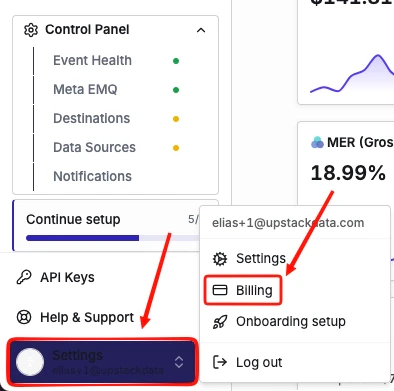
Log in to your [Upstack Data account](https://app.upstackdata.com/), then go to **Settings → Billing**.
 Click the **Billing History** tab to see all of your previous invoices.
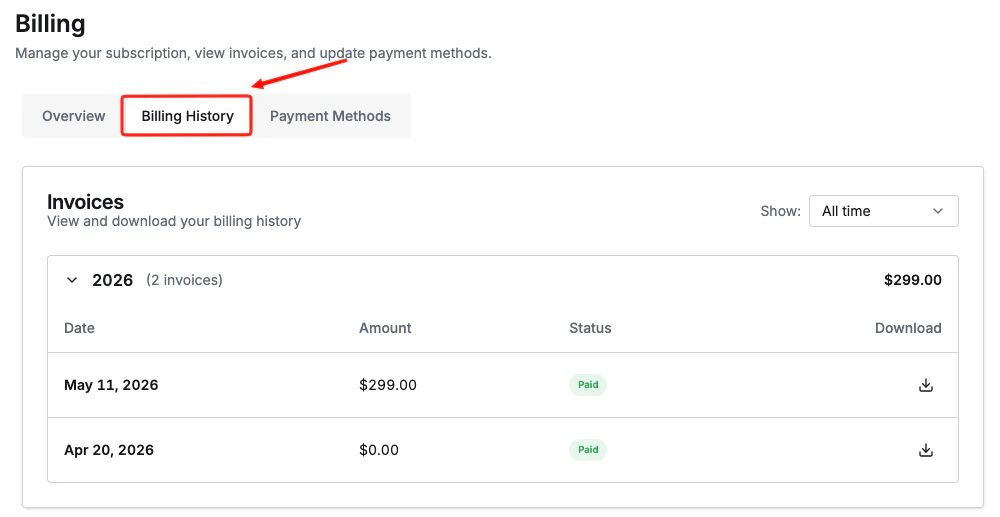 Click any invoice to view its details or download it as a PDF.
You also receive a PDF copy of each invoice by email every billing cycle.
## If you're on Shopify billing
Shopify handles invoicing for apps billed through the Shopify App Store. To view your charges:
1. Log in to your [Shopify admin](https://admin.shopify.com).
2. Go to **Settings → Billing**.
3. Select a billing cycle to see itemized app charges, including Upstack Data.
**Not sure which billing type you're on?**
Refer to [How do I identify my billing method?](/billing/how-do-i-identify-my-billing-method) to find out which billing method you're on.
***
## Related Articles
Click any invoice to view its details or download it as a PDF.
You also receive a PDF copy of each invoice by email every billing cycle.
## If you're on Shopify billing
Shopify handles invoicing for apps billed through the Shopify App Store. To view your charges:
1. Log in to your [Shopify admin](https://admin.shopify.com).
2. Go to **Settings → Billing**.
3. Select a billing cycle to see itemized app charges, including Upstack Data.
**Not sure which billing type you're on?**
Refer to [How do I identify my billing method?](/billing/how-do-i-identify-my-billing-method) to find out which billing method you're on.
***
## Related Articles